


See the battery charge of your wireless devices.
Bisbee shows battery levels for:
- Bluetooth headphones and earbuds
- Bluetooth keyboards
- Bluetooth mice
- Game controllers
- Logitech devices connected using the Bolt receiver
- Your laptop’s internal battery
Bisbee is tiny, fast, portable and requires no installation. Just download and run. It runs quietly in the background, displays the lowest battery level directly in the system tray next to the clock, and alerts you when any device drops below 25%.
Features
| Real-time battery monitoring | Displays battery levels for all connected Bluetooth and wireless devices |
| System tray indicator | Shows the lowest battery level at a glance |
| Low-battery alerts | Get notified when any device drops below 25% |
| Quick connect/disconnect | Double-click Bluetooth audio devices to connect or disconnect instantly |
| Tiny footprint | Portable and fast |
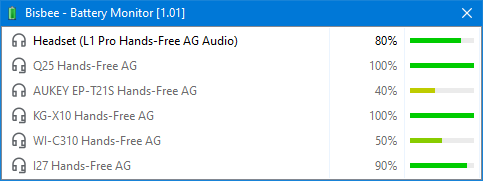
See all battery levels at a glance
All detected devices are displayed in one place. You don’t need to check each device one by one.
Double-clicking a Bluetooth audio device allows you to connect and disconnect this device.
Version 1.09 · 2 months ago · 206kb · VirusTotal Report · Version History
New: Logitech HID++ Battery support added 
Do you like the software? Make a Donation!
You don’t need to have a paypal account in order to make a donation.
You don’t need to have a paypal account in order to make a donation.
Do you have questions? Check the FAQ.
Do you need additional features or would you like to help with the translation? Send a Mail!
Install using package managers:
winget install --id the-sz.Bisbee -e --forcecontent_copychoco install bisbee.portable -y --ignore-checksumcontent_copy
Supported Languages:
 English German Greek Italian Japanese
Supported Operating Systems:
 Windows 11
 Windows 10
 Windows 8
 Windows 7
 Windows Server
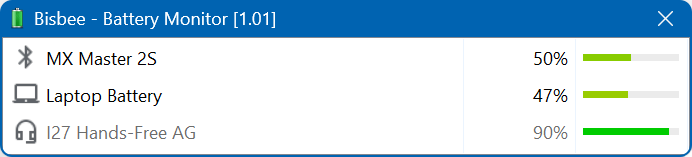
Screenshot:
Related software in category ‘System Monitoring’:

York
Log all network traffic

Yale
See network adapter usage

Norwood
See CPU usage graph
Download Mirrors: